Is Your B2B Website Technically Healthy Enough to Rank?
Problem Statement
B2B websites often have a strange SEO problem. The company may have strong products, years of expertise and a good reputation, but the website still struggles to generate organic visibility. Sometimes the issue isn’t content. Search engines may be unable to crawl important pages efficiently, indexation may be messy, redirects may be broken, or the site’s architecture may make important services difficult to discover. A technical SEO audit helps uncover these issues before adding another 50 blog posts to a website that already has a foundation problem.
Start With Crawlability
Before worrying about rankings, make sure search engines can actually access the pages that matter.
Check:
- Robots.txt
- XML sitemap
- Crawl errors
- Blocked resources
- Important pages accidentally blocked
- Redirect chains
- Broken links
- Server errors
A page cannot perform in search if Google can’t properly access it.
Check What Google Has Actually Indexed
Don’t assume that every important page is indexed.
Check:
- Service pages
- Product pages
- Industry pages
- Location pages
- Case studies
- Important resources
Also look for pages that probably shouldn’t be indexed, such as:
- Internal search results
- Duplicate URLs
- Parameter variations
- Thin pages
- Test pages
- Unnecessary filter combinations
The objective isn’t to maximise the number of indexed pages.
It’s to make sure the right pages are indexed.
Review Your Website Architecture
A B2B website should make its business structure obvious.
For example:
Industries → Solutions → Products → Applications
or:
Services → Service Detail → Case Studies → Enquiry
If important pages are buried deep inside the website, they may receive less internal authority and become harder for users to discover.
Ask:
Can a buyer reach our most important commercial page in a few clicks?
If the answer is no, your architecture probably needs work.
Check URLs and Canonicals
Review whether URLs are:
- Clean
- Consistent
- Descriptive
- Stable
- Free from unnecessary parameters
Then check canonical tags.
A common problem with larger B2B websites is having multiple URLs representing essentially the same content.
Search engines need a clear signal about which version should be treated as the primary page.
Don’t Ignore Redirects
Check for:
- 301 redirects
- Redirect chains
- Redirect loops
- 404 pages
- Old URLs from previous websites
- Broken internal links
This becomes especially important after:
- Website redesigns
- CMS migrations
- URL changes
- Rebranding
- Website restructuring
Never delete an important URL during a redesign without understanding what organic traffic and links it already has.
Check Core Web Vitals and Page Experience
Technical SEO isn’t just about crawling.
Check:
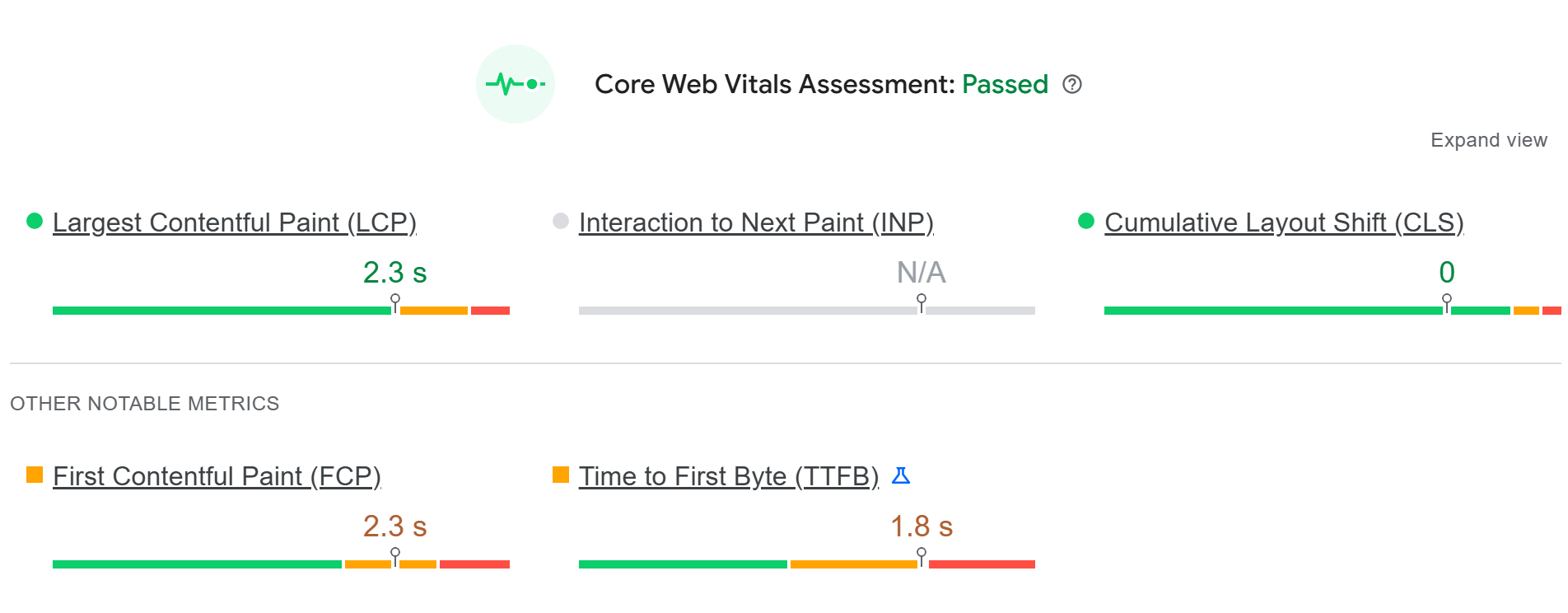
- Largest Contentful Paint
- Interaction to Next Paint
- Cumulative Layout Shift
- Mobile performance
- Page responsiveness
- Heavy JavaScript
- Large images
- Unnecessary third-party scripts
B2B websites often contain large videos, animations, forms and tracking tools.
Make sure those don’t turn the website into a slow experience.
Like this as we have for our website:
Review Mobile Experience
Even if your B2B buyers often use desktops, search engines still care about the mobile experience.
Check:
- Navigation
- Text readability
- Buttons
- Forms
- Menus
- Images
- Tables
- Product information
- Page loading
A technically strong desktop website doesn’t compensate for a broken mobile experience.
Check Internal Linking
Internal links should connect related commercial and informational pages.
For example:
Industry page → Solution page → Product page → Case study → Enquiry
Look for important pages that have:
- Very few internal links
- No contextual links
- Deep click depth
- No links from relevant high-authority pages
Internal linking helps users navigate and helps search engines understand relationships between pages.
Review Structured Data
Where relevant, check structured data for:
- Organisation
- Breadcrumbs
- Products
- Articles
- FAQs where applicable
- Local business information
- Other supported schema types
Structured data should describe what is actually present on the page.
Don’t add schema simply because a plugin makes it available.
Check Your B2B Website’s Search Signals
Technical SEO also supports the way search systems understand your business.
Make sure your website clearly communicates:
- Who the company is
- What it sells
- Which industries it serves
- Where it operates
- What products or services it offers
- Which expertise it has
- How different pages relate to each other
This is increasingly useful as search expands beyond traditional results into AI-generated answers.
The 2027 Technical SEO Checklist
Crawlability
- Robots.txt reviewed
- XML sitemap working
- Important pages crawlable
- No major server errors
- Broken links identified
- Redirect chains removed
Indexation
- Important commercial pages indexed
- Duplicate pages controlled
- Thin pages reviewed
- Unnecessary URLs excluded
- Canonicals correctly implemented
Architecture
- Important pages are easy to reach
- URL structure is consistent
- Internal linking is logical
- Breadcrumbs are useful
- Commercial pages aren’t buried
Performance
- Core Web Vitals reviewed
- Mobile experience tested
- Images optimised
- JavaScript reviewed
- Third-party scripts controlled
Search Understanding
- Organisation information is clear
- Products/services are clearly defined
- Industry relationships are clear
- Structured data is relevant
- AI search visibility opportunities reviewed
What We’d Fix First
Don’t treat every technical issue as equally important.
We’d prioritise based on:
Impact × Number of affected pages × Business value
A broken canonical across 20,000 product pages deserves attention before a minor issue on one blog post.
That’s the difference between a technical SEO checklist and an actual SEO strategy.
Why Growthify?
Growthify approaches technical SEO as the foundation of the wider organic growth system. For B2B websites, that means looking beyond isolated technical errors and understanding how crawlability, architecture, commercial pages, content, internal linking and conversion paths work together. We also consider AEO/GEO and how clearly a company’s products, services, industries and expertise are represented across its website. The objective isn’t to produce a 200-point audit that sits in a spreadsheet. It’s to identify the technical issues that can actually affect visibility and business outcomes.
Key Takeaways
- Technical SEO is the foundation of B2B organic visibility.
- Make sure search engines can crawl and index the pages that actually matter.
- Don’t confuse a large number of indexed pages with good SEO.
- Website architecture should reflect how your buyers navigate the business.
- Check redirects and technical changes carefully during migrations.
- Core Web Vitals and mobile experience still matter.
- Technical SEO should support content, commercial pages and conversions.
- The goal isn’t to fix every technical issue. It’s to fix the issues that can actually hold the business back.